Recently I discovered a gem of a website from a comment in reddit recommending a source for learning JAVA programming interactively. The exercises look really amazing, and free too! Massive open online course (MOOC) allows you to follow Java exercises, preform them in your own desktop IDE (NetBeans) and submit you code against the server to progress though the various exercises.
However,
the directions how to get started only described a method which requires you to download a bundled version NetBeans with the TMC (test my code) plugin. The problem is i already have NetBeans installed and configured.
After doing some googling I found an easy method of installing TMC plugin onto my existing installation of NetBeans without having to download the bundle. So if you use this way of installing the plugin, on Ubuntu just go to the software center, download NetBeans, and follow the steps bellow. Simple.
The reason I am re-posting it here is because the GitHub page I used recently 404'd, and i want the infomation to be still available as I found it very usefull myself. If you interested in the original page, it is still in the google cache
here. It was marked "DEPRECATED", however the part of the tutorial for the plugin method worked great for me. ¯\_ᵔ ͜ʖᵔ_/¯
Just keeping this info available to others who may need it.
Source address. (404)
User/credit: jamox
INSTALLING TMC-PLUGIN TO EXSISTING NETBEANS INSTALLATION, do this in paja.
Open NetBeans. Make sure that version you are using is at least 7.2.1. (7.3 or newer is recommendend)
Go to Tools -> Plugins
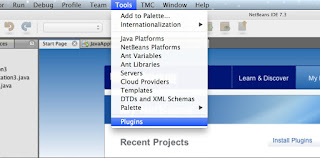
Select tab Settings click Add.
Set name to TMC
Url to http://update.testmycode.net/tmc-netbeans_hy/updates.xml
Select tab Available Plugins, search for TMC It should show only one result. Check checkbox on its row and and select Install
Click Next
Check Accept the terms in all license agreements
Click continue, when instaler complains that these plugins are not signed.
When installation is complete restart NetBeans
When you start TMC/NetBeans for the first time, the below window should open. If it does not open, you can find it from the TMC-part of the NetBeans menu bar.
Give the Username and Password that you gave during registration.
Press the button "refresh list" and select from "Current course"
By pressing "ok" the assignment "projects" are downloaded to your computer.
Note: for the mooc.fi course, the server address is "https://tmc.mooc.fi/mooc". You must register via their website for login details, see here.


